
AI Creative Workflow
The best AI video generators in 2026: 8 platforms ranked on quality, price, and real results
We tested 8 AI video generators - Runway, Kling AI, Pika, HeyGen, Synthesia, Luma Ray3, Hailuo AI, and the now-discontinued Sora - and ranked each one on quality, pricing, and the use cases they actually serve.
TL;DR
The AI video generation market has fragmented by use case - there's no single best tool. Runway leads on raw output quality (it holds the #1 spot on the Artificial Analysis Text-to-Video benchmark). Kling AI wins on cinematic character consistency. Hailuo AI is the only platform offering watermark-free free-tier generation. HeyGen dominates avatar video for business content. Higgsfield is the filmmaker's pick for cinematic control with Adobe integration. Krea AI is the all-in-one creative suite for versatile creators. Pika and image-to-video-ai.best are the friendliest entry points for creators who want to experiment across multiple models without committing to one ecosystem. And Sora - OpenAI's much-hyped competitor - was discontinued in April 2026, which tells us a lot about what actually matters in this market.
The two tools most people get wrong: HeyGen and Synthesia aren't general video generators - they're avatar platforms optimized for speaking-head content. If you're trying to animate a product shot or create a cinematic scene, you want Runway, Kling, Luma, Pika, or Hailuo instead.
The AI video generation market looked completely different 18 months ago. A handful of experimental tools could barely hold a consistent face across five seconds of video. Today, eight distinct platforms serve meaningfully different audiences - with pricing that ranges from genuinely free to enterprise contracts - and OpenAI's entry into the space already came and went.
We went through every major platform's pricing pages, feature documentation, and community feedback to give you an honest comparison. Not a sponsored tier list. Not "all of them are great in different ways." An actual take on which tool fits which job, with the numbers to back it.
Here's what we found.
How AI video generation actually works
Before diving into the tools, it's worth understanding what separates them under the hood - because the differences in quality and use case largely come down to architecture choices the companies made at the model level.
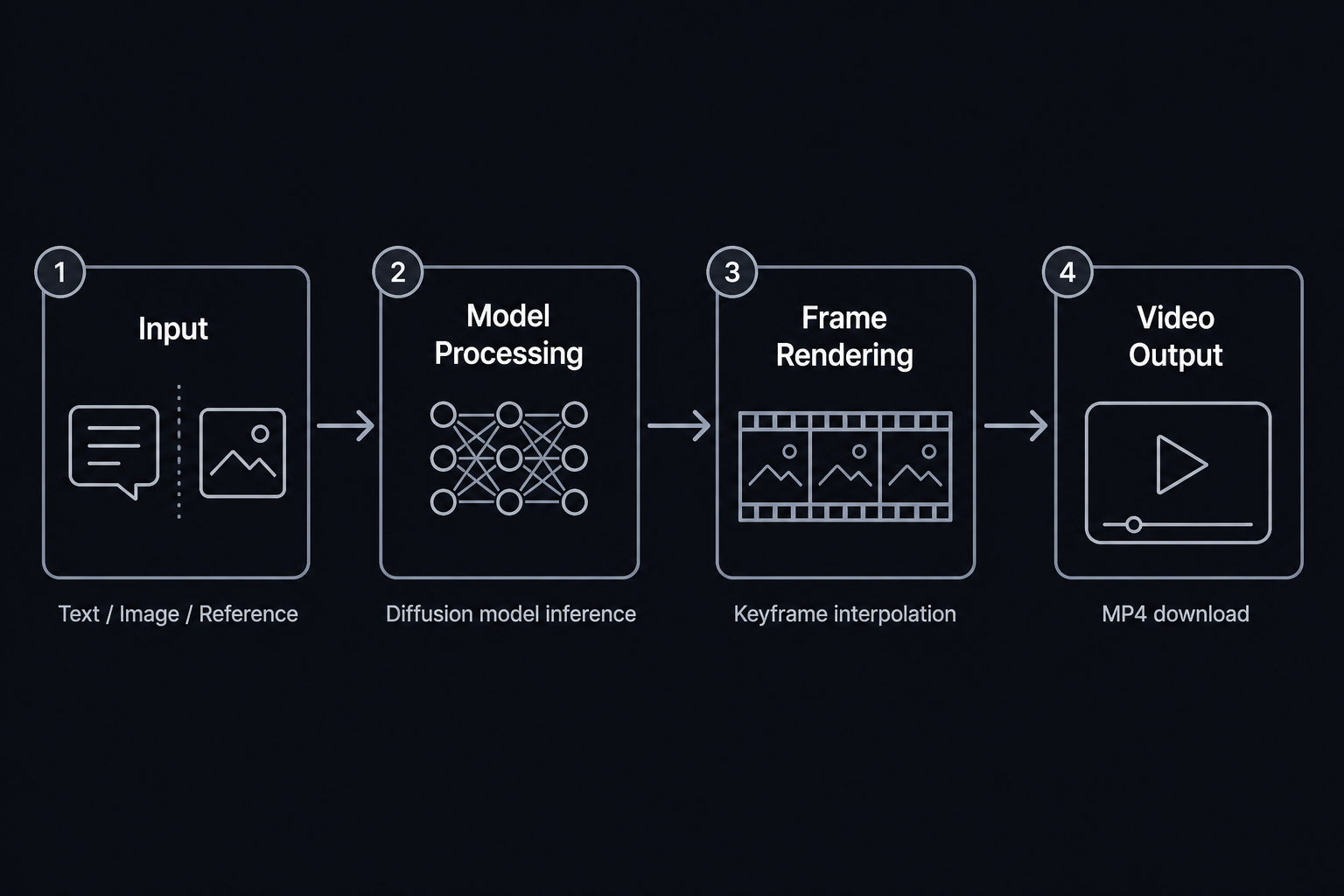
Every AI video generator takes an input (text prompt, image, or reference video), runs it through a diffusion or transformer-based model that learns to predict plausible motion frames, and outputs an MP4. The differences that matter are: how the model was trained (on what data, with what architectural choices), what controls it exposes to users (keyframes, motion intensity, reference locking), and what the output resolution and duration limits are.
Runway's Gen-4.5 is trained to prioritize physical accuracy and aesthetic range. Kling AI's Universal Reference system is trained specifically for character consistency - locking a face or body across multiple generation passes. Synthesia and HeyGen are trained almost exclusively on human talking-head content, which is why they're extraordinary for avatar video but less useful for anything else.
Understanding this helps you stop comparing tools that aren't actually competing - and skip the ones that were never the right fit to begin with.
At a glance: all 8 tools compared
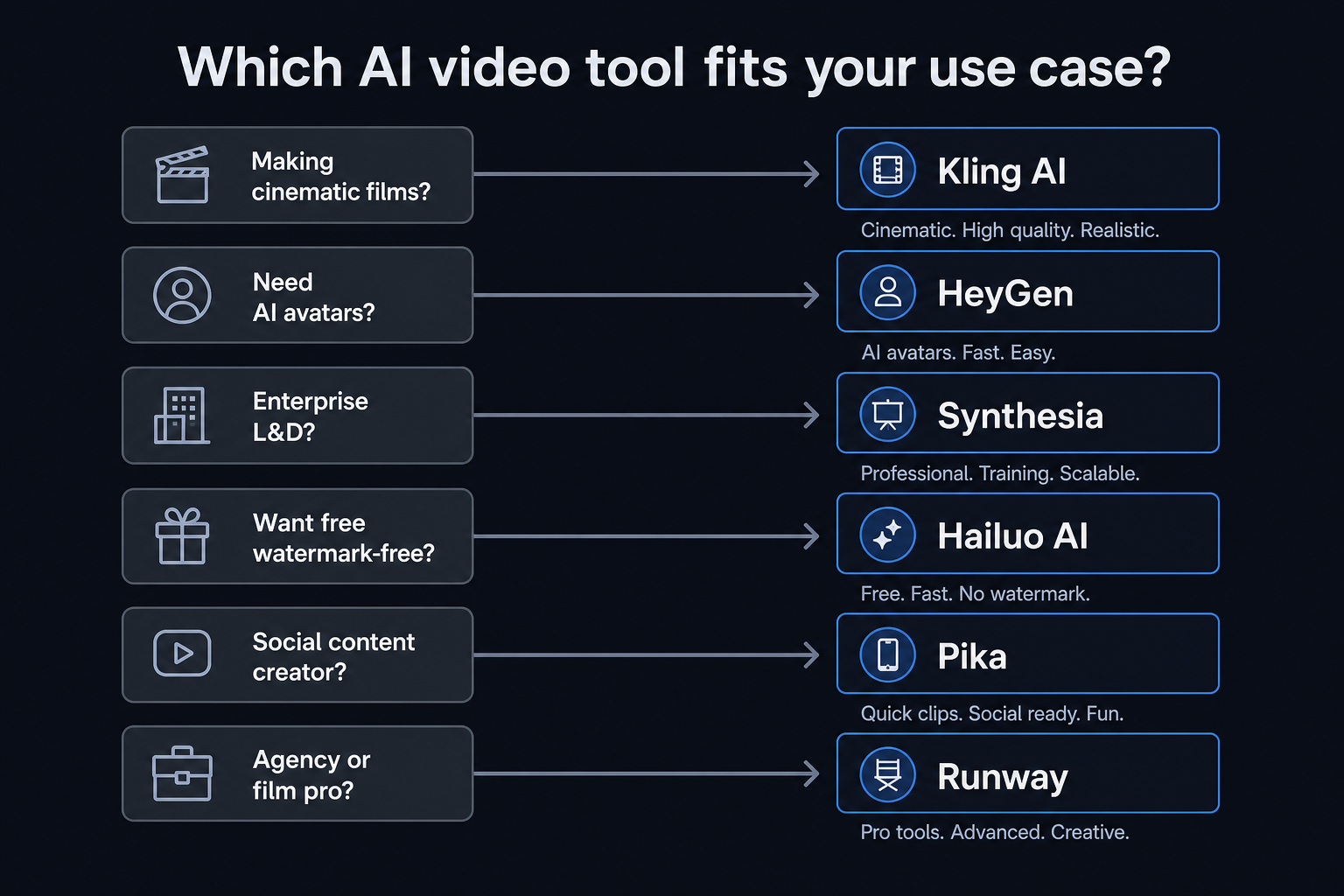
| Tool | Best for | Entry paid price | Free tier | Max video duration | Languages |
|---|---|---|---|---|---|
| Runway | Professional filmmakers, agencies | $12/mo (625 credits) | 125 one-time credits | ~10-15s per generation | Limited |
| Kling AI | Cinematic scenes, character consistency | ~$10/mo (Kola credits) | Yes (watermarked) | 15+ seconds | 20+ |
| Pika | Social content, quick editing | $10/mo (700 credits) | 80 credits/mo | ~10s | Limited |
| Higgsfield | Filmmakers, cinematic control | $15/mo (200 credits) | Yes (limited) | Varies by model | Limited |
| HeyGen | AI avatar business videos | $29/mo (600 credits) | 3 videos/month | 30 min/video | 175+ |
| Krea AI | All-in-one creative suite | $10/mo (5,000 units) | 100 units/day | Varies by model | Limited |
| Hailuo AI | Budget creators, music videos | Free / $0.07/sec | Watermark-free free tier | ~6s (free) | Limited |
| Sora | Discontinued | - | - | - |
1. Runway - best for professional-grade video output
Runway is the benchmark. Its Gen-4.5 model, released December 2025, ranks #1 on the Artificial Analysis Text-to-Video benchmark with 1,247 Elo points - clear of every other consumer video AI as of June 2026. It's what Lionsgate uses for film pre-production, what KPF Architecture uses for design visualization, and what NVIDIA co-developed with for their own research pipeline.
The quality comes with a catch: Gen-4.5 costs ~25 credits per second of video. On Runway's $28/month Pro plan (2,250 credits), that translates to roughly 90 seconds of high-quality video per month. That's not a lot if you're generating dozens of clips. It's also where Runway's older models become useful - Gen-4 Turbo at ~5 credits per second and Gen-3 Alpha at ~4 credits per second still produce excellent output for creators who don't need every clip to be benchmark-quality.
Runway pricing
| Plan | Monthly | Credits | Gen-4.5 equivalent |
|---|---|---|---|
| Free | $0 | 125 (one-time) | ~5 seconds |
| Standard | $12 | 625/mo | ~25 seconds |
| Pro | $28 | 2,250/mo | ~90 seconds |
| Max | $76 | 9,500/mo | ~380 seconds |
| Enterprise | Custom | Custom | Custom |
Runway also offers third-party models (Veo, Kling, Seedance) directly in the platform - a useful hedge for teams that want access to multiple generation engines without managing separate subscriptions.
The documented limitations are worth reading: Runway explicitly acknowledges that Gen-4.5 has causal reasoning gaps and object permanence issues (doors opening before handles are pressed, physics quirks in complex scenes). They're actively researching solutions. The transparency is a good sign - and it's useful context when deciding whether a particular generation needs manual cleanup.
Verdict: The professional's pick. If output quality is the primary metric and you're generating content for film pre-production, architectural visualization, or high-production marketing, Runway is where you start. The credit costs are real - budget accordingly.
2. Kling AI - best for cinematic scenes and character consistency
Kling AI, built by Kuaishou Technology, has one meaningful advantage over Runway: character consistency. Its Universal Reference system lets you lock a character's face and body across multiple generation passes - something that's notoriously difficult with diffusion models in general. The result is video that feels coherent when you're making multi-shot content with recurring characters.
The other differentiator is duration. Kling 3.0 generates up to 15+ seconds of video per clip, compared to Runway's typical 10-second outputs. For narratives that require actual story arcs within a single generation, this matters. Combining Kling's extended duration with Universal Reference means you can build multi-shot character-consistent sequences without stitching together dozens of short clips.
The catch is Kling's Western accessibility. The platform is built for a Chinese-first audience - documentation and support are primarily in Mandarin, and its Kola coin credit system doesn't publish clear USD pricing publicly (you'll need to sign up and see conversion rates). There are also data privacy concerns that some enterprise teams flag about a Chinese-origin platform.
Kling 3.0 also introduces Universal Audio-Visual - character-driven lip-sync with multilingual audio support - which puts it in partial competition with HeyGen on the avatar video side, though HeyGen remains the dedicated avatar platform.
"Best cinematic quality of any AI video tool I've tested. The motion physics feel more natural than Runway on complex scenes." - r/StableDiffusion (community consensus, multiple threads)
Verdict: The filmmaker's secret weapon for character-driven content. If you're producing narrative video with recurring characters and need long, consistent shots, Kling's Universal Reference system is in a class of its own. Just go in with eyes open about the Chinese-first platform dynamics.
3. Pika - best for social creators who want to edit, not just generate
Pika is the only platform in this list that treats video generation as the beginning of a workflow, not the end of one. Its suite of editing tools - Pikascenes (scene transitions), Pikadditions (visual enhancements), Pikaswaps (element swaps), Pikatwists (morphing and distortions), and Pikaframes (keyframe editing) - means you can generate a clip and then transform it within the same environment.
That's more than most of the other tools here offer post-generation, and it's genuinely useful for social content creators who need to iterate quickly. You're not committed to a static output; you can swap an element, add an effect, or change the transition style without re-prompting from scratch.
Pika's newest model, Pika 2.5, runs on either a Turbo or Pro engine - the former is faster and cheaper (10-60 credits per clip), the latter higher quality (20-80 credits per clip). The Pika Agent is a conversational interface that lets you create through dialogue rather than prompt boxes - available across Discord, Slack, Telegram, WhatsApp, and Instagram. It's a genuinely different creative paradigm for some users.
Pika pricing
| Plan | Monthly | Annual | Credits/mo |
|---|---|---|---|
| Free | $0 | $0 | 80 |
| Standard | $10 | $8 (20% off) | 700 |
| Pro | $35 | $28 (20% off) | 2,300 |
| Fancy | $95 | $76 (20% off) | 6,000 |
The free tier's 80 monthly credits is thin - enough for experimentation but not real production. The credit system is also more opaque than competitors on the per-feature cost breakdown, which is the most consistent complaint in community feedback.
Verdict: The best platform for social creators who need to iterate and edit, not just generate. If your workflow involves multiple revisions per clip, Pika's editing suite saves time that would otherwise go into re-generating from scratch.
4. Higgsfield - best for filmmakers who want cinematic control
Higgsfield is built by filmmakers, for filmmakers - 40% of the team are working producers and directors, and it shows. The platform's Cinema Studio feature gives you granular control over camera movement, motion presets, and visual effects that most AI video tools don't expose. You're not just prompting and hoping; you're directing.
The Soul ID feature solves one of the biggest practical headaches in AI video: character consistency. Like Kling's Universal Reference, Soul ID locks a character's appearance across multiple generation passes. Higgsfield pairs this with support for multiple underlying models (Kling 3.0, Veo 3.1, Seedance 2.0) - so you're choosing the generation engine that fits the shot, not locked into one model's quirks.
The Adobe Premiere Pro and After Effects plugins are a genuine differentiator. Most AI video tools exist outside a professional post-production pipeline; Higgsfield sits inside it. That matters enormously for creators who already work in Adobe's ecosystem and don't want to rebuild their workflow around a new tool.
Higgsfield pricing
| Plan | Monthly | Credits | Key features |
|---|---|---|---|
| Starter | $15 | 200/mo | Core video generation, basic models |
| Plus | $39 | 1,000/mo | All models, Cinema Studio, Soul ID |
| Ultra | $99 | 3,000/mo | Priority access, all features |
| Team | $59/seat | Pooled | Collaboration, shared workspace |
Verdict: The best platform for creators who want director-level control over AI video, not just prompt-and-generate. If you're already in Adobe's ecosystem and making content where camera movement and character consistency matter, Higgsfield is built for you.
5. HeyGen - best for AI avatar business videos
HeyGen has generated 137 million videos, 112 million avatars, and 18 million video translations - numbers that dwarf any other platform in this comparison on sheer usage volume. It was named G2's #1 Fastest Growing Product of 2025 and is trusted by HubSpot, Workday, HP, JPMorgan, and Autodesk.
The core product is avatar-based video creation: you select or upload an AI avatar, input a script, and HeyGen generates a professional-looking speaking-head video in minutes. Avatar V - HeyGen's latest - is widely considered the most realistic AI avatar available as of mid-2026, with natural micro-expressions, hand gestures, and lip-sync that holds up at 4K resolution.
The 175+ language support with natural lip-sync is HeyGen's strongest technical differentiator. Creating a video in English and then distributing it in Mandarin, Spanish, and Japanese with accurate lip-sync - from a single recording - is genuinely remarkable. This is why it dominates in multinational marketing and HR onboarding use cases.
HeyGen pricing
| Plan | Monthly | Credits | Key limits |
|---|---|---|---|
| Free | $0 | - | 1 min/video, 3 videos/month |
| Creator | $29 | 600 | 30 min/video, 1080p, voice cloning |
| Pro | $49 | 1,000 | 4K export, faster processing |
| Business | $149 + $20/seat | 1,500 | 5+ custom twins, SAML/SSO, LMS |
| Enterprise | Custom | Flexible | Unlimited |
Credit usage: Avatar IV/V costs 20 credits per minute of video; video translation costs 5 credits per minute. On the Creator plan ($29/month, 600 credits), that's 30 minutes of Avatar IV/V video, or 2 hours of translated content per month.
Verdict: The best tool for business video content that features a speaking presenter. If your use case involves explainer videos, product demos, training content, or multilingual marketing - and you don't need cinematic quality, just professional avatar quality - HeyGen is the clear choice at its price point.
6. Krea AI - best all-in-one creative suite for versatile creators
Krea AI isn't just a video tool - it's the Swiss Army knife of AI creation. Image generation, video generation, 3D objects, upscaling to 22K resolution, LoRA fine-tuning for custom styles, a real-time canvas that generates at 50ms - it's all in one place. For creators who bounce between image ideation, video generation, and asset refinement throughout a project, not having to juggle five different subscriptions is a genuine workflow advantage.
The depth is real. Krea's 64+ model library includes Veo 3, Kling, Hailuo, Runway, and its own proprietary Krea 2 foundation model with 1,000+ style options. The video upscaling to 120fps and frame interpolation is the best available for smoothing out AI-generated footage that comes back choppy. And the Nodes workflow editor - a visual canvas for chaining AI steps together - puts serious automation in reach without requiring any code.
The numbers back the product: 30M+ users across 191 countries, with enterprise clients including Lego, Samsung, Nike, and Microsoft. It's one of the few tools that scales cleanly from a $10/month hobbyist plan to a custom enterprise deployment.
Krea pricing
| Plan | Monthly | Compute units | Key features |
|---|---|---|---|
| Free | $0 | 100/day | Limited models, no credit card |
| Basic | $10 | 5,000/mo | All models, commercial license |
| Pro | $35 | 20,000/mo | Most popular, full feature access |
| Max | $105 | 60,000/mo | Heavy production use |
| Business | Custom | 80,000+/mo | Up to 50 seats, SAML/SSO |
Verdict: The best platform for creators who want one tool that handles the full creative pipeline - not just video generation, but image creation, upscaling, style fine-tuning, and workflow automation. If you're always context-switching between tools, Krea is worth testing as a consolidation play.
7. Hailuo AI - best free option, period
Hailuo AI by MiniMax makes a claim that no other major AI video platform can match: its free tier generates watermark-free videos. No credit card required, no watermark on output, 200+ initial free credits when you sign up.
That's a significant structural advantage over every other platform in this list. Runway, Pika, Synthesia - they all either watermark free-tier output or restrict downloads entirely. Hailuo doesn't. For budget creators who want to test whether AI-generated video fits their workflow before spending anything, this is the obvious starting point.
The Hailuo 2.3 model supports text-to-video, image-to-video, and start/end frame control - where you upload keyframes and the model generates smooth transitions between them. The start/end frame feature is particularly strong for music video and choreography content, where predictable motion timing matters. A Light Studio tool launched in March 2026 adds advanced lighting control to the mix.
The honest trade-off: quality on open-ended prompts is less consistent than Runway or Kling at the high end. The 6-second generation limit on the free tier is also noticeable. But at the $0.07/second pay-as-you-go rate (promotional pricing as of June 2026), a 6-second clip costs $0.42 - a hard number to argue with. Compare that to Runway's Gen-4.5 at roughly $0.30-0.50/second.
Hailuo is based in China (parent company MiniMax), which comes with similar data privacy considerations as Kling AI for teams handling sensitive content.
Verdict: The best free AI video generator, full stop. If you want to experiment without spending money, or if your budget is limited and quality consistency matters less than volume, Hailuo AI is where you start. The watermark-free free tier is a genuine industry outlier.
8. Sora - what OpenAI's shutdown tells us about the market
OpenAI's Sora was discontinued on April 26, 2026. The API sunset date is September 24, 2026.
This deserves more than a passing mention, because Sora's trajectory is a map of every mistake a video AI platform can make. The product had genuine technical advantages - synchronized audio (unusual at launch), a "cameo" feature for placing real faces into AI scenes, and video quality that was genuinely impressive for wide shots. But it launched invite-only, never published generation limits, priced itself opaquely (users reported ~$0.30/second for 720p and ~$0.50/second for HD based on community experiments), and got positioned as a social platform rather than a creator tool. The result: creators chose Runway and Kling instead.
"I've been on the invite list for 6 months and never got access. Just using Runway at this point." - r/OpenAI (representative thread comment, multiple sources)
The lesson is that raw model capability doesn't win markets. Access, transparent pricing, and fit-to-workflow win markets. Every platform still standing in 2026 learned this the hard way or got lucky.
How to pick the right AI video tool
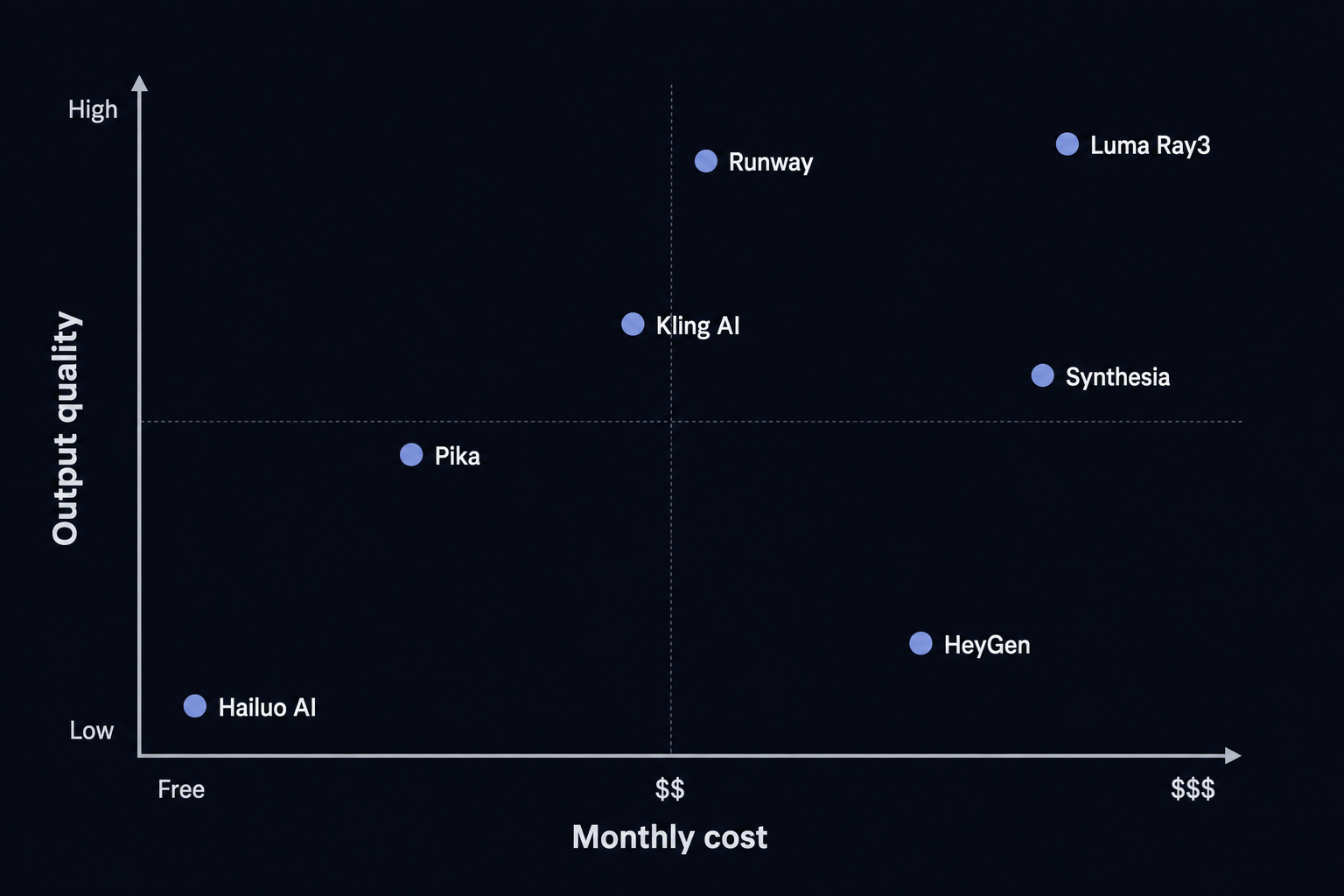
The right framework isn't "which tool is best" - it's "what am I actually making."
Quick decision guide:
- Cinematic scenes, no recurring characters - Runway (benchmark-leading quality)
- Cinematic scenes with recurring characters - Kling AI (Universal Reference system)
- Social content, quick iterations - Pika (editing suite) or image-to-video-ai.best (multi-model support)
- Business video with AI presenters - HeyGen (175+ languages, Avatar V)
- Enterprise training at scale - Synthesia (SCORM, SOC 2, Fortune 100 track record)
- Filmmakers needing camera/character control - Higgsfield (Cinema Studio, Adobe plugin, Soul ID)
- All-in-one: image + video + upscaling - Krea AI (64+ models, real-time canvas, 22K upscaling)
- Free, no watermark - Hailuo AI (the only free watermark-free option)
- Multi-model experimentation on a budget - image-to-video-ai.best (access to multiple models from $10/month)
One thing most comparisons skip: the tools aren't mutually exclusive. A lot of production teams use Runway for the high-quality hero shots and Hailuo for rapid B-roll iteration. HeyGen for the presenter content and Pika for the social cuts. The workflow that wins is the one that uses each tool where it's actually strongest.
Try image-to-video-ai.best
image-to-video-ai.best is built for creators who want to work across multiple AI video models - Seedance 2.0, GPT-Image-2, Seedream 4.5, Nano Banana - without managing separate accounts, billing systems, and interfaces. The platform supports three distinct workflows: Text/Image to Video for animating a single strong image; Frames to Video for start/end frame-guided generation; and Reference to Video for maintaining character and style consistency across variations.
The pricing starts at $10/month annually (Starter plan), which gives you 6,000 credits for the year - roughly 600 videos at 50 credits each. All paid plans include watermark-free exports and commercial workflow support. The free tier includes 20 initial credits plus daily check-in rewards, enough to test the platform before committing.
For creators who aren't locked into a single model ecosystem and want flexibility across generation approaches, it's a practical place to start.
Frequently Asked Questions
Which AI video generator is best in 2026?+
It depends on your use case. <a href='https://runwayml.com'>Runway</a> ranks #1 on the Artificial Analysis benchmark for output quality - ideal for professional filmmakers. <a href='https://klingai.com'>Kling AI</a> delivers cinematic character consistency. For free watermark-free video, <a href='https://hailuoai.video'>Hailuo AI</a> is unmatched. Enterprise teams building training videos should look at <a href='https://www.synthesia.io'>Synthesia</a> or <a href='https://www.heygen.com'>HeyGen</a>. For a simpler starting point that supports multiple models and workflows, try <a href='https://image-to-video-ai.best'>image-to-video-ai.best</a>.
Is there a free AI video generator without watermark?+
<a href='https://hailuoai.video'>Hailuo AI</a> is currently the only major AI video platform that offers watermark-free video generation on its free tier. New users receive 200+ free credits with no payment required. Most other platforms (Runway, Pika, Synthesia) watermark free-tier output or restrict downloads entirely.
How much does AI video generation cost per video?+
Costs vary widely by platform and quality. Hailuo AI charges $0.07 per second of video at 720p (promotional rate as of June 2026). Runway's Gen-4.5 model costs roughly $0.30–0.50 per second of output on the Pro plan. HeyGen's Avatar IV/V costs 20 credits per minute of video, which on the Creator plan works out to about $0.05 per second. <a href='https://image-to-video-ai.best'>image-to-video-ai.best</a> starts at $10/month for 6,000 annual credits.
What happened to OpenAI Sora?+
OpenAI discontinued the Sora consumer app on April 26, 2026. The Sora API will sunset on September 24, 2026. The platform struggled with invite-only access, opaque pricing, and users consistently preferring more transparent alternatives like Runway and Kling AI. OpenAI has not announced a replacement product as of June 2026.
Which AI video tool is best for creating business and training videos?+
<a href='https://www.synthesia.io'>Synthesia</a> and <a href='https://www.heygen.com'>HeyGen</a> are the two leading platforms for business video creation. Synthesia is used by 90% of Fortune 100 companies and supports 160+ languages with lip-sync - making it the top choice for global L&D teams. HeyGen's Avatar V is the most realistic AI avatar available as of 2026, and its 175+ language support makes it strong for multilingual marketing content. Synthesia starts at $19/month; HeyGen's Creator plan is $29/month.